Robot Framework Beginner Course
Duration: 3 Days Hours per Day: 7 (Total: 21 Hours)
Day 1 – Fundamentals & Core Concepts (7 Hours)
Hour 1: Introduction to Automation & Robot Framework
1. What is test automation?
Test is step to check whether something works as expected. Test automation is automating the steps used for checking works as expected.
2. Why Robot Framework?
It is a software tool that support writing of test steps/cases in simple plain english keyword format which is useful for non technical testers. It also has support for writing gherkin style test steps. Apart from this this high level info, it has support for assertion, report, error handling, testcase management. It has good eco system of libraries which support automating web app, API, mobile app.
Keyword-driven approach
It is way of writing testcase in simple plain english which can be easily understandable by non technical users.
Use cases: Web, API, RPA
Course flow & expectations
This guide covers basic essentials of robot framework that is need to start using the tool.
Hour 2: Architecture & Setup
Robot Framework architecture
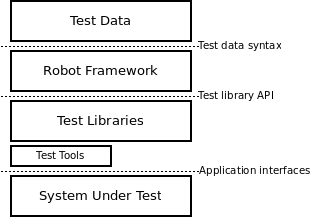
Test execution flow
https://robotframework.org/robotframework/latest/RobotFrameworkUserGuide.html#execution-order
Installing Python & Robot Framework
https://docs.robotframework.org/docs/getting_started/ide
Installing SeleniumLibrary
IDE setup (VS Code)
https://docs.robotframework.org/docs/getting_started/ide
Hour 3: Robot Framework File Structure
.robot file syntax
https://robotframework.org/robotframework/latest/RobotFrameworkUserGuide.html#test-data-sections
Writing first Robot test
https://docs.robotframework.org/docs/getting_started/how_to_write_rf
Hour 4: Running Tests & Reports
Running tests via command line
https://robotframework.org/robotframework/latest/RobotFrameworkUserGuide.html#using-command-line-options
Running single tests & test suites
robot --test testcasename tests.robot
robot tests.robot

#RUN WITH VARIABLE
python3 -m robot --variable TESTTIMEOUT:"10 seconds" .
Understanding:
https://robotframework.org/robotframework/latest/RobotFrameworkUserGuide.html#test-results
log.html
report.html
Common execution options
Option              Purpose                                             Example
--include            Run tests with specific tag                          robot --include smoke tests/
--exclude            Skip tests with specific tag                         robot --exclude regression tests/
--variable           Set variable from command line                       robot --variable ENV:QA tests/
--variablefile       Load variables from a variable file at runtime       robot --variablefile vars.py tests/
--outputdir          Specify results directory                            robot --outputdir results tests/
--loglevel           Set logging level                                    robot --loglevel DEBUG tests/
--exitonfailure      Stop execution on first failure                      robot --exitonfailure tests/
--rerunfailed        Rerun only failed tests                              robot --rerunfailed results/output.xml tests/
--pythonpath         Add custom library path                              robot --pythonpath libs tests/
--suite              Run specific test suite                              robot --suite Smoke tests/
--test               Run specific test case                               robot --test "Login Test" tests/
--listener           Attach listener file                                 robot --listener listener.py tests/
--metadata           Add metadata to report                               robot --metadata Env:QA tests/
--console            Control console output                               robot --console verbose tests/
--dryrun             Validate tests without execution                     robot --dryrun tests/
Hour 5: Variables
Scalar variables
#Basic Artithmetic
*** Variables ***
${A}    8
${B}    2

*** Test Cases ***
Variable Arithmetic
    ${sum}=       Evaluate    ${A} + ${B}
    ${diff}=      Evaluate    ${A} - ${B}
    ${product}=   Evaluate    ${A} * ${B}
    ${quotient}=  Evaluate    ${A} / ${B}
    Log    Sum=${sum}, Diff=${diff}, Product=${product}, Quotient=${quotient}
#STRING OPERATION
*** Settings ***
Library    String    # Import String library for string operations

*** Variables ***
${STR1}        Hello
${STR2}        World
${MAIN_STR}    Robot Framework is powerful

*** Test Cases ***
String Operations Demo

    # ------------------------------------------------------------
    # 1) Concatenate 2 strings
    # ------------------------------------------------------------
    ${concat}=    Catenate    SEPARATOR=    ${STR1}    ${STR2}
    Log    Concatenated String: ${concat}

    # ------------------------------------------------------------
    # 2) Split a string into a list using space as separator
    # ------------------------------------------------------------
    ${split_list}=    Split String    ${MAIN_STR}    separator=
    Log    Split Result: ${split_list}

    # ------------------------------------------------------------
    # 3) Replace a substring with another substring
    # ------------------------------------------------------------
    ${replaced}=    Replace String    ${MAIN_STR}    powerful    awesome
    Log    Replaced String: ${replaced}

    # ------------------------------------------------------------
    # 4) Check if a substring is present in a string
    #    Returns TRUE or FALSE
    # ------------------------------------------------------------
    ${contains}=    Run Keyword And Return Status    Should Contain    ${MAIN_STR}    Framework
    Log    Substring Present: ${contains}

    # ------------------------------------------------------------
    # 5) Count total characters in the string (including spaces)
    # ------------------------------------------------------------
    ${char_count}=    Get Length    ${MAIN_STR}
    Log    Character Count: ${char_count}

    # ------------------------------------------------------------
    # 6) Generate a random string of 10 alphabetic characters
    # ------------------------------------------------------------
    ${random}=    Generate Random String    10    [LETTERS]
    Log    Random String: ${random}
Variable scope & best practices
https://robotframework.org/robotframework/latest/RobotFrameworkUserGuide.html#variable-priorities-and-scopes
Hour 6: Keywords
Built-in vs library keywords
Creating user-defined keywords
Keyword arguments & return values
Keyword reusability
Hour 7: Resource Files & Practice
Resource files
Importing shared keywords
Hands-on: Refactor test using keywords
Q&A
Day 2 – Web Automation with SeleniumLibrary (7 Hours)
Hour 1: SeleniumLibrary Basics
What is SeleniumLibrary?
Browser drivers overview
Opening & closing browsers
Basic browser configuration
Hour 2: Locators
ID, Name, XPath, CSS
Locator best practices
Dynamic locators
Hands-on locator exercises
Hour 3: Web Interactions
Input text
Click elements
Submit forms
Get text & attributes
Basic validations
Hour 4: Waits & Synchronization
Timing issues in UI automation
Explicit waits
Wait Until Element Is Visible
Avoiding flaky tests
Hour 5: Handling Advanced Web Elements
Dropdowns
Alerts
Frames & iframes
Multiple windows/tabs
Hour 6: Web Test Design
Designing readable test cases
Given-When-Then style
Separating test data
Reusable web keywords
Hour 7: Hands-On Web Automation
Automate a login flow
Validation & assertions
Debugging failures
Code review
Day 3 – Test Management, Best Practices & Mini Project (7 Hours)
Hour 1: Setup & Teardown
Test setup & teardown
Suite setup & teardown
Initialization & cleanup patterns
Hour 2: Tags & Test Execution Control
Creating and using tags
Running tests by tags
Skipping tests
Smoke vs regression tests
Parallel Execution
To run in different version of browser
File: argFiles/chrome.args

--variable BROWSER:chrome
--variable BROWSER_VERSION:125.0

File: argFiles/firefox125.args

--variable BROWSER:firefox
--variable BROWSER_VERSION:125.0

File: argFiles/edge.args

--variable BROWSER:edge
--variable BROWSER_VERSION:146.0
pabot --processes 3  --argumentfile1 argFiles/chrome.args  --argumentfile2 argFiles/firefox125.args  --argumentfile2 argFiles/edge.args  --variablefile redbus/variables.py  redbus/Tests/T
icketBooking.robot
docker compose file content to start selenium grid with browser nodes
services:

  selenium-hub:
    image: selenium/hub:4.21.0
    container_name: selenium-hub
    ports:
      - "4442:4442"
      - "4443:4443"
      - "4444:4444"
    environment:
      - SE_GRID_MAX_SESSION=16
      - SE_GRID_BROWSER_TIMEOUT=300
      - SE_GRID_TIMEOUT=300

  chrome:
    image: selenium/node-chrome:4.21.0

    shm_size: 2gb
    depends_on:
      - selenium-hub
    environment:
      - SE_EVENT_BUS_HOST=selenium-hub
      - SE_EVENT_BUS_PUBLISH_PORT=4442
      - SE_EVENT_BUS_SUBSCRIBE_PORT=4443
      - SE_NODE_MAX_SESSIONS=4
      - SE_NODE_OVERRIDE_MAX_SESSIONS=true
    ports:
      - "7901:7900"

  firefox:
    image: selenium/node-firefox:4.21.0

    shm_size: 2gb
    depends_on:
      - selenium-hub
    environment:
      - SE_EVENT_BUS_HOST=selenium-hub
      - SE_EVENT_BUS_PUBLISH_PORT=4442
      - SE_EVENT_BUS_SUBSCRIBE_PORT=4443
      - SE_NODE_MAX_SESSIONS=4
      - SE_NODE_OVERRIDE_MAX_SESSIONS=true
    ports:
      - "7902:7900"

  firefox_v4_20:
    image: selenium/node-firefox:125.0-20260404

    shm_size: 2gb
    depends_on:
      - selenium-hub
    environment:
      - SE_EVENT_BUS_HOST=selenium-hub
      - SE_EVENT_BUS_PUBLISH_PORT=4442
      - SE_EVENT_BUS_SUBSCRIBE_PORT=4443
      - SE_NODE_MAX_SESSIONS=4
      - SE_NODE_OVERRIDE_MAX_SESSIONS=true
    ports:
      - "7903:7900"


  edge:
    image: selenium/node-edge:146.0-20260404

    shm_size: 2gb
    depends_on:
      - selenium-hub
    environment:
      - SE_EVENT_BUS_HOST=selenium-hub
      - SE_EVENT_BUS_PUBLISH_PORT=4442
      - SE_EVENT_BUS_SUBSCRIBE_PORT=4443
      - SE_NODE_MAX_SESSIONS=4
      - SE_NODE_OVERRIDE_MAX_SESSIONS=true
    ports:
      - "7904:7900"
Hour 3: Error Handling & Debugging
Understanding keyword failures
Run Keyword And Continue On Failure
Run Keyword And Ignore Error
Debugging using logs
Hour 4: Best Practices
Naming conventions
Folder structure
robot-framework-project/
│
├── tests/
│   │
│   ├── api/
│   │   ├── users_api.robot
│   │   └── orders_api.robot
│   │
│   └── ui/
│       ├── login.robot
│       ├── dashboard.robot
│       └── settings.robot
│
├── resources/
│   ├── pages/
│   ├── keywords/
│   ├── locators/
│   └── variables/
│
│
├── libraries/
│   ├── database_library.py
│   ├── api_client.py
│   ├── browser_utils.py
│   └── custom_keywords.py
│
├── data/
├── argfiles/
│   ├── browsers/
│   │   ├── chrome.args
│   │   ├── firefox.args
│   │   └── edge.args
│   │
│   ├── environments/
│   │   ├── dev.args
│   │   ├── qa.args
│   │   └── prod.args
│   │
│   └── suites/
│       ├── smoke.args
│       └── regression.args
|
├── configs/
├── reports/
├── scripts/
├── ci/
│   ├── github-actions/
│   │   └── robot.yml
│   │
│   ├── jenkins/
│   │   └── Jenkinsfile
│   │
│   └── azure-devops/
│       └── pipeline.yml
|
├── requirements.txt
├── README.md
└── robot.yaml
Reusability guidelines
Common beginner mistakes
Hour 5: Data-Driven Testing (Intro)
Test templates
Simple data-driven examples
When to use data-driven tests
Hour 6: Mini Project
Design test scenarios
Implement end-to-end web test
Use variables, keywords & tags
Execute & review results
Hour 7: Wrap-Up & Next Steps
Mini project review
Interview-oriented tips
Next learning path:
Page Object Model
API testing
CI/CD integration
Q&A
Course Outcome
By the end of 3 days, learners will be able to: Write Robot Framework test cases from scratch
Automate basic web applications
Create reusable keywords & resource files
Debug failures using logs
Follow automation best practices